

Schedule & Booking
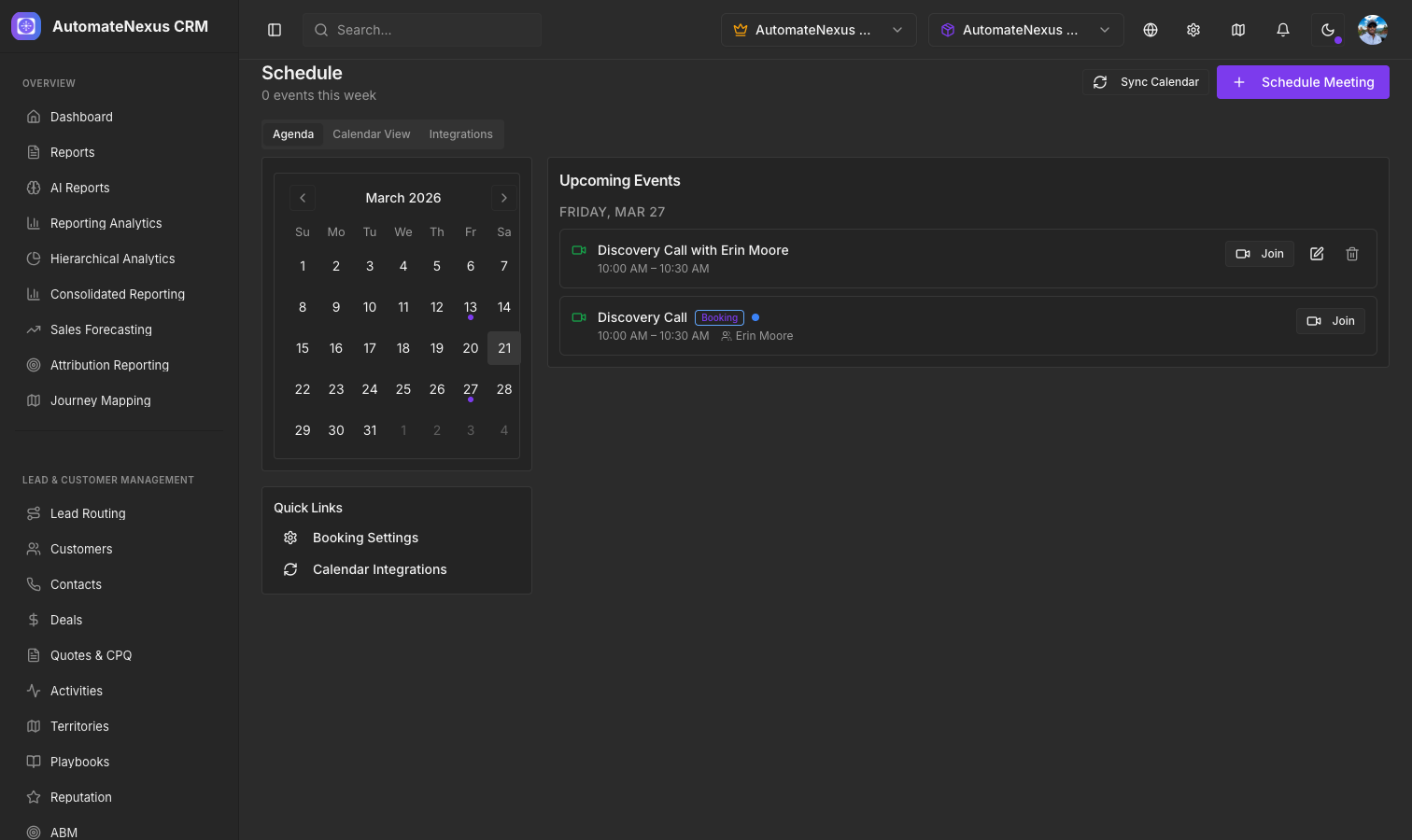
Booking Pages
Create public booking pages that let prospects and customers schedule meetings with you. Each booking page can be customized with:
- Available time slots and duration options
- Buffer time between meetings
- Custom questions and form fields
- Meeting type (phone, video, in-person)
- Confirmation and reminder emails
Calendar Sync
AutomateNexus integrates with external calendars through two-way sync:
- Google Calendar — Sync events bidirectionally so availability is always accurate
- Outlook/Office 365 — Connect your Microsoft calendar for seamless scheduling
Two-way sync ensures that meetings booked in AutomateNexus appear on your external calendar, and events from your external calendar block availability on your booking pages.
Appointment Management
From the Schedule page you can:
- View all upcoming appointments in a calendar or list view
- Reschedule or cancel appointments
- Send reminders to attendees
- View meeting details and preparation notes
Automated Reminders
Configure automatic reminder emails sent before meetings:
- 24-hour reminder with meeting details
- 1-hour reminder with join link
- Post-meeting follow-up email
Public Booking Links
Share your booking link via email, your website, or social media. When a prospect books a meeting:
- A contact record is created if one does not exist
- The meeting appears on both calendars
- An activity is logged on the contact timeline
- The assigned rep receives a notification